A zone mixer decides which source is heard in each area and how staff control it. These Cloud options cover different approaches to source selection, paging and local operation.
Network-controlled zoning
Cloud DCM1e
Eight stereo line inputs; eight balanced zone outputs, arranged as two stereo and six mono zones. Its onboard web server enables control from devices on the same network, with installer-defined access.
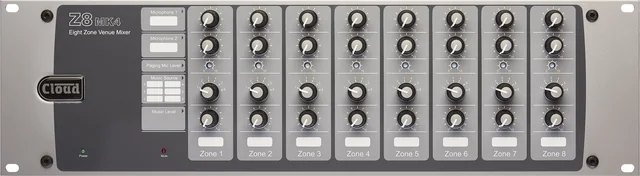
An analogue venue mixer with eight mono zones, six music source inputs and two microphone inputs. Optional wall controls let staff adjust source and level locally; paging and priority settings support daily operation.
Two stereo zones plus a mono utility output, with six stereo line inputs and one microphone input. A compact 1U mixer for smaller venues; optional RL-1 controls provide remote music level adjustment.
These are line-level zone mixers, not speaker power amplifiers. Amplification, loudspeaker circuits, wall controls and paging accessories are specified separately.
From source to speaker
The mixer is part of the system.
01SourcesMusic, TV audio, microphones or local inputs
02Zone mixerSource routing, level, priorities and staff controls
03AmplificationPower and channels matched to the loudspeaker circuits
04LoudspeakersPlacement and coverage matched to the space
We agree the zones and user controls first, then specify compatible equipment. Where bass reinforcement or speech is required, that becomes part of the system design rather than an afterthought.
Plan around the venue
How a zoned system can work.
Illustrative layouts to discuss at survey. The final mixer, speaker count and amplifier channels depend on the actual building.
Bar & restaurant
One venue, different atmospheres.
Separate the bar, dining area and private room so their sound levels can differ. Decide whether private dining needs a local source or microphone and whether announcements should reach selected areas.
Define reception, lounge, restaurant and meeting-room zones. Establish which staff need local controls, which sources they may select and where central control remains with management.
Plan music coverage across customer areas while keeping staff spaces independent where needed. Agree paging priorities and check the sound at normal working levels.
Further application reference: Cloud’s application diagrams. These examples describe design approaches, not completed Pegasus projects.
Plan the system
Start with the zones, sources and people.
Tell us which areas need music or speech, where staff should have control and which equipment you want to retain. We can then discuss the mixer, amplification and speakers as one system.